
iOS Integration
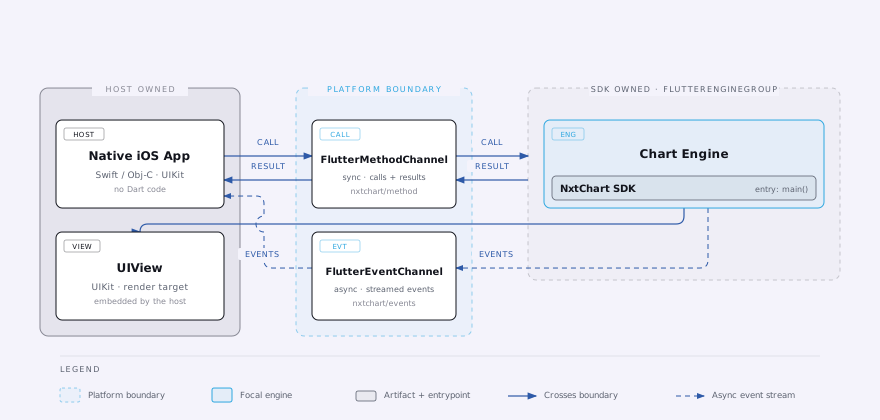
Embed NeoCharts into a native iOS app via platform channels.
Embed NeoCharts into an existing native iOS app (Swift / ObjC).
The SDK is distributed as pre-built binary frameworks (.xcframework bundles) — your native
app only implements the platform channel handlers that supply data and receive trading
callbacks.
This is the complete integration — the full channel set, alerts, and OI analysis.
Requirements
| Requirement | Minimum |
|---|---|
| iOS deployment target | 13.0 |
| Xcode | 15.0 |
1. Embed the frameworks in Xcode
Access
NeoCharts is distributed directly to licensed partners, not published to CocoaPods/SPM. Your
IOURING team hands you the .xcframework bundles directly.
License
The .xcframework bundles are built for your app and already contain your license — no key file
to add. Every bundle ID you build must be in your license, and the app needs internet access for
a once-a-day license check. See Licensing.
- Open your project in Xcode
- Select the app target → General → Frameworks, Libraries, and Embedded Content
- Add all provided
.xcframeworkbundles - Set each to Embed & Sign
Simulator builds
If you encounter architecture errors on simulator builds, add to your target's build settings:
EXCLUDED_ARCHS[sdk=iphonesimulator*] = arm64Only needed if your .xcframework bundles ship an x86_64-only simulator slice. On Apple
Silicon Macs with an arm64 simulator slice, do not exclude arm64 — that removes the only
architecture the simulator can run.
2. Register channel handlers
Register all handlers in AppDelegate before flutterEngine.run().
import UIKit
import Flutter
import FlutterPluginRegistrant

@main
class AppDelegate: UIResponder, UIApplicationDelegate {

    // EventChannel sinks — whichever view is active holds the live reference
    var marketDataSink: FlutterEventSink?
    var ordersSink:     FlutterEventSink?
    var ocoOrdersSink:  FlutterEventSink?
    var positionsSink:  FlutterEventSink?
    var tradeEventSink: FlutterEventSink?
    var alertsSink:     FlutterEventSink?

    private let engineGroup = FlutterEngineGroup(name: "nxt_chart", project: nil)
    lazy var chartEngine = engineGroup.makeEngine(withEntrypoint: nil, libraryURI: nil)

    func application(
        _ application: UIApplication,
        didFinishLaunchingWithOptions launchOptions: [UIApplication.LaunchOptionsKey: Any]?
    ) -> Bool {

        chartEngine.run()
        GeneratedPluginRegistrant.register(with: chartEngine)
        registerChannels(messenger: chartEngine.binaryMessenger)
        return true
    }

    private func registerChannels(messenger: FlutterBinaryMessenger) {

        // ── nxtchart/data ─────────────────────────────────────────────────────
        FlutterMethodChannel(name: "nxtchart/data", binaryMessenger: messenger)
            .setMethodCallHandler { [weak self] call, result in
                guard let self else { return }
                switch call.method {

                // ── Init metadata (called once at startup) ───────────────────
                case "symbolInfo":           result(self.symbolInfoJson())
                case "underlyingSymbolInfo": result(self.underlyingSymbolInfoJson())
                case "optionSymbols":        result(self.optionSymbolsJson())
                case "futureSymbols":        result(self.futureSymbolsJson())
                // Populating this hides the Volume indicator for symbols in
                // the list (spot indices have no traded volume).
                case "indexSymbols":         result(self.indexSymbolsJson())
                case "marketTimings":        result(self.marketTimingsJson())
                case "hasOCO":               result(true)
                case "isMarketOrderSupported": result(true)
                case "storageKey":           result("user_\(self.userId())")
                // Called each time the right panel is shown, not
                // cached at startup — safe to delay until background data
                // (e.g. option chain) finishes loading.
                case "atmSymbols":           result(self.atmSymbolsJson())
                case "chartTopOptions":      self.fetchTopOptions { json in result(json) }

                // ── Historical data ──────────────────────────────────────────
                case "loadData":
                    let args            = call.arguments as! [String: Any]
                    let symbolId        = args["symbolId"] as! String
                    let from            = args["from"] as! Int
                    let to              = args["to"] as! Int
                    let intervalSeconds = args["intervalSeconds"] as! Int
                    let requiredBars    = args["requiredBars"] as! Int
                    self.fetchOHLCV(symbolId: symbolId, from: from, to: to,
                                    intervalSeconds: intervalSeconds,
                                    requiredBars: requiredBars) { json in
                        result(json)
                    }

                // ── Option chain & OI analysis ────────────────────────────────
                case "fetchOptionDetails":
                    let underlyingSymbolId = (call.arguments as! [String: Any])["underlyingSymbolId"] as! String
                    self.fetchOptionDetails(underlyingSymbolId: underlyingSymbolId) { json in result(json) }

                case "fetchOIAnalysis":
                    let args = call.arguments as! [String: Any]
                    self.fetchOIAnalysis(underlyingSymbolId: args["underlyingSymbolId"] as! String,
                                          expiry: args["expiry"] as! String,
                                          timeFrom: args["timeFrom"] as! Int,
                                          timeTo: args["timeTo"] as! Int) { json in result(json) }

                case "fetchOIChange":
                    let args = call.arguments as! [String: Any]
                    self.fetchOIChange(underlyingSymbolId: args["underlyingSymbolId"] as! String,
                                        expiries: args["expiries"] as! [String],
                                        timeFrom: args["timeFrom"] as! Int,
                                        timeTo: args["timeTo"] as! Int) { json in result(json) }

                case "fetchOI":
                    let args = call.arguments as! [String: Any]
                    self.fetchOI(underlyingSymbolId: args["underlyingSymbolId"] as! String,
                                 expiries: args["expiries"] as! [String]) { json in result(json) }

                case "fetchPcrIntraday":         self.fetchPcrIntraday { json in result(json) }
                case "fetchAtmStraddleIntraday": self.fetchAtmStraddleIntraday { json in result(json) }
                case "fetchAtmIvIntraday":       self.fetchAtmIvIntraday { json in result(json) }

                // ── Parameterized replacements (xxxFor) -- scoped to an explicit id
                //    instead of "whatever's currently charted." underlyingSymbolInfoFor is
                //    called on every chart load; the other 7 aren't called by the SDK yet,
                //    but still need a real case here or every call falls through to
                //    default below. See /docs/trading/chart-data and
                //    /docs/trading/option-chain for which is which. ───────────────────────
                case "underlyingSymbolInfoFor":
                    let symbolId = (call.arguments as! [String: Any])["symbolId"] as! String
                    result(self.underlyingSymbolInfoJson(symbolId)) // nullable

                case "optionSymbolsFor":
                    let underlyingId = (call.arguments as! [String: Any])["underlyingId"] as! String
                    result(self.optionSymbolsJson(underlyingId))

                case "futureSymbolsFor":
                    let underlyingId = (call.arguments as! [String: Any])["underlyingId"] as! String
                    result(self.futureSymbolsJson(underlyingId)) // nullable

                case "atmSymbolsFor":
                    let underlyingId = (call.arguments as! [String: Any])["underlyingId"] as! String
                    result(self.atmSymbolsJson(underlyingId)) // nullable

                case "chartTopOptionsFor":
                    let underlyingId = (call.arguments as! [String: Any])["underlyingId"] as! String
                    result(self.topOptionsJson(underlyingId))

                case "fetchPcrIntradayFor":
                    let underlyingId = (call.arguments as! [String: Any])["underlyingId"] as! String
                    self.fetchPcrIntraday(underlyingId) { json in result(json) }

                case "fetchAtmStraddleIntradayFor":
                    let underlyingId = (call.arguments as! [String: Any])["underlyingId"] as! String
                    self.fetchAtmStraddleIntraday(underlyingId) { json in result(json) }

                case "fetchAtmIvIntradayFor":
                    let underlyingId = (call.arguments as! [String: Any])["underlyingId"] as! String
                    self.fetchAtmIvIntraday(underlyingId) { json in result(json) }

                // ── Funds (fetched each time the drawer's Funds panel opens) ────
                case "fundsData": result(self.fundsDataJson())

                // ── Alerts ─────────────────────────────────────────────────────
                case "modifyAlert":
                    self.yourBroker.modifyAlert(params: call.arguments as! String)
                    result(nil)

                case "createAlert":
                    self.yourBroker.createAlert(params: call.arguments as! String)
                    result(nil)

                case "deleteAlert":
                    let alertId = (call.arguments as! [String: Any])["alertId"] as! String
                    self.yourBroker.deleteAlert(alertId: alertId)
                    result(nil)

                // ── Order actions (params arrive as a raw JSON string —
                //    see Reference for each method's exact shape) ────────────────
                case "placeOrder":
                    let p = self.jsonObject(from: call.arguments)
                    self.yourBroker.placeOrder(
                        symID: p["symID"] as! String, price: p["price"] as! Double,
                        orderType: p["orderType"] as! String,
                        orderAction: p["orderAction"] as! String, qty: p["qty"] as! Int)
                    result(nil)

                case "modifyOrder":
                    let p = self.jsonObject(from: call.arguments)
                    self.yourBroker.modifyOrder(
                        orderID: p["orderID"] as! String, symID: p["symID"] as! String,
                        price: p["price"] as! Double, orderType: p["orderType"] as! String,
                        orderAction: p["orderAction"] as! String, qty: p["qty"] as! Int)
                    result(nil)

                case "cancelOrder":
                    let orderID = (call.arguments as! [String: Any])["orderID"] as! String
                    self.yourBroker.cancelOrder(orderID: orderID)
                    result(nil)

                case "placeOCOOrder":
                    self.yourBroker.placeOCOOrder(params: call.arguments as! String)
                    result(nil)

                case "modifyOCOOrder":
                    self.yourBroker.modifyOCOOrder(params: call.arguments as! String)
                    result(nil)

                case "cancelOCOOrder":
                    let groupId = (call.arguments as! [String: Any])["groupId"] as! String
                    self.yourBroker.cancelOCOOrder(groupId: groupId)
                    result(nil)

                case "groupAdjustOrders":
                    self.yourBroker.groupAdjustOrders(params: call.arguments as! String)
                    result(nil)

                default:
                    result(FlutterMethodNotImplemented)
                }
            }

        // ── nxtchart/marketData ───────────────────────────────────────────────
        FlutterEventChannel(name: "nxtchart/marketData", binaryMessenger: messenger)
            .setStreamHandler(SinkHandler { [weak self] args, sink in
                self?.marketDataSink = sink
                if let sink, let symbols = args as? String {
                    self?.yourTickSource.subscribe(symbols) { tickJson in sink(tickJson) }
                }
            })

        // ── nxtchart/symbolSearch ─────────────────────────────────────────────
        FlutterEventChannel(name: "nxtchart/symbolSearch", binaryMessenger: messenger)
            .setStreamHandler(SinkHandler { [weak self] args, sink in
                // The chart takes only the first emission per query — no
                // need to keep pushing after the initial result.
                guard let sink, let query = args as? String else { return }
                self?.yourApi.searchSymbols(query) { json in sink(json) }
            })

        // ── nxtchart/orders ───────────────────────────────────────────────────
        FlutterEventChannel(name: "nxtchart/orders", binaryMessenger: messenger)
            .setStreamHandler(SinkHandler { [weak self] _, sink in self?.ordersSink = sink })

        // ── nxtchart/ocoOrders ────────────────────────────────────────────────
        FlutterEventChannel(name: "nxtchart/ocoOrders", binaryMessenger: messenger)
            .setStreamHandler(SinkHandler { [weak self] _, sink in self?.ocoOrdersSink = sink })

        // ── nxtchart/positions ────────────────────────────────────────────────
        FlutterEventChannel(name: "nxtchart/positions", binaryMessenger: messenger)
            .setStreamHandler(SinkHandler { [weak self] _, sink in self?.positionsSink = sink })

        // ── nxtchart/tradeEvents ──────────────────────────────────────────────
        FlutterEventChannel(name: "nxtchart/tradeEvents", binaryMessenger: messenger)
            .setStreamHandler(SinkHandler { [weak self] _, sink in self?.tradeEventSink = sink })

        // ── nxtchart/alerts ───────────────────────────────────────────────────
        FlutterEventChannel(name: "nxtchart/alerts", binaryMessenger: messenger)
            .setStreamHandler(SinkHandler { [weak self] _, sink in self?.alertsSink = sink })
    }

    // Order/modify params arrive as a raw JSON string, not a dictionary.
    private func jsonObject(from arguments: Any?) -> [String: Any] {
        guard let json = arguments as? String,
              let data = json.data(using: .utf8),
              let obj = try? JSONSerialization.jsonObject(with: data) as? [String: Any]
        else { return [:] }
        return obj
    }
}

// Minimal reusable stream handler
class SinkHandler: NSObject, FlutterStreamHandler {
    private let handler: (Any?, FlutterEventSink?) -> Void
    init(_ handler: @escaping (Any?, FlutterEventSink?) -> Void) { self.handler = handler }
    func onListen(withArguments args: Any?, eventSink sink: @escaping FlutterEventSink) -> FlutterError? {
        handler(args, sink); return nil
    }
    func onCancel(withArguments args: Any?) -> FlutterError? {
        handler(args, nil); return nil
    }
}
3. Launching the chart
import SwiftUI
import Flutter

private func appDelegate() -> AppDelegate {
    UIApplication.shared.delegate as! AppDelegate
}

struct ChartView: UIViewControllerRepresentable {
    func makeUIViewController(context: Context) -> FlutterViewController {
        FlutterViewController(engine: appDelegate().chartEngine, nibName: nil, bundle: nil)
    }
    func updateUIViewController(_ vc: FlutterViewController, context: Context) {}
}
Run the app — you should see a live chart with real-time data, indicators, drawing tools, and working order/position/alert actions, all driven by the handlers you registered above.
4. Pushing live data
Once the EventChannel sinks are active, push data from wherever your streams emit:
let app = UIApplication.shared.delegate as! AppDelegate

// Live ticks
app.marketDataSink?(
    """[{"symbolId":"RELIANCE","ltp":2411.5,"ltq":100,"chng":11.5,"chngPer":0.48,"ltt":1700001234000}]"""
)

// Updated orders list — see Reference for the full Order JSON schema
app.ordersSink?(
    """[{"orderID":"ORD123","type":"limit","orderAction":"buy","productType":"normal","avgPrice":2400.0,"netQty":10,"fillQty":0,"ordTime":"20-11-2025 09:15:00","orderStatus":"open","symbol":{"id":"RELIANCE","...":"see symbolInfo"}}]"""
)

// Updated OCO orders list (pending SL+TP pairs) — see Reference for the full schema
app.ocoOrdersSink?(
    """[{"groupId":"OCO001","symID":"RELIANCE","name":"Reliance Industries","exchange":"NSE","side":"buy","productType":"normal","stopLoss":{"type":"stoploss","side":"sell","triggerPrice":2350.0,"qty":10,"price":2340.0,"fillQty":0},"target":{"type":"limit","side":"sell","triggerPrice":2450.0,"qty":10,"price":2450.0,"fillQty":0}}]"""
)

// Updated positions list — see Reference for the full Position JSON schema
app.positionsSink?(
    """[{"symID":"RELIANCE","netQty":10,"avgPrice":2400.0,"productType":"normal"}]"""
)

// Action feedback (order/alert outcome notification)
app.tradeEventSink?(
    """{"type":"positive","message":"Order placed successfully"}"""
)

// Updated alerts list — see Reference for the full alert JSON schema
app.alertsSink?(
    """[{"alertId":"357807025062912","symbolInfo":{"id":"RELIANCE","...":"see symbolInfo"},"triggerPrice":"2450","enabled":true,"triggered":false,"createdAt":1769509922000}]"""
)
Tip
Push ordersSink and positionsSink before or during loadData so the chart
has order/position state ready on first render.
5. Info.plist
No NeoCharts-specific keys required. For the Index + Call/Put and Call + Put layouts (see Chart Layouts), enable landscape orientations:
<key>UISupportedInterfaceOrientations</key>
<array>
  <string>UIInterfaceOrientationPortrait</string>
  <string>UIInterfaceOrientationLandscapeLeft</string>
  <string>UIInterfaceOrientationLandscapeRight</string>
</array>
Channel Reference
See the Trading section — each page documents its own nxtchart/data
method(s) and channel per platform; the shape is identical on Android and iOS, only the
calling syntax differs (shown above).
Theming (theme on nxtchart/data, and the nxtchart/theme channel) is optional; see
Theming.
Troubleshooting
| Symptom | Fix |
|---|---|
No such module 'Flutter' | Ensure all .xcframework bundles are added and set to Embed & Sign |
| "Your NeoCharts license is invalid or has expired." instead of the chart | This bundle ID isn't in your license, or the bundles were built for a different app — see Licensing |
| Blank chart — init never completes | Ensure all startup methods on nxtchart/data (symbolInfo, underlyingSymbolInfo, optionSymbols, futureSymbols, indexSymbols, marketTimings, hasOCO, isMarketOrderSupported, storageKey) return a value (no FlutterMethodNotImplemented) |
| Blank chart — no candles | Verify loadData returns valid OHLCV JSON ordered oldest-first |
| Orders/positions not shown | Push to ordersSink/positionsSink before or during loadData |
| Alerts not shown | Push to alertsSink whenever your alert list changes |
| Funds panel blank | Implement fundsData on nxtchart/data |
MissingPluginException | Register channels before flutterEngine.run() in AppDelegate |
| Landscape not working | Add landscape orientations to UISupportedInterfaceOrientations |
Simulator arm64 error | Add EXCLUDED_ARCHS[sdk=iphonesimulator*] = arm64 to build settings |
See the Trading section for wire formats and every nxtchart/data method,
and How It Works for the data and trade flow.