
How It Works
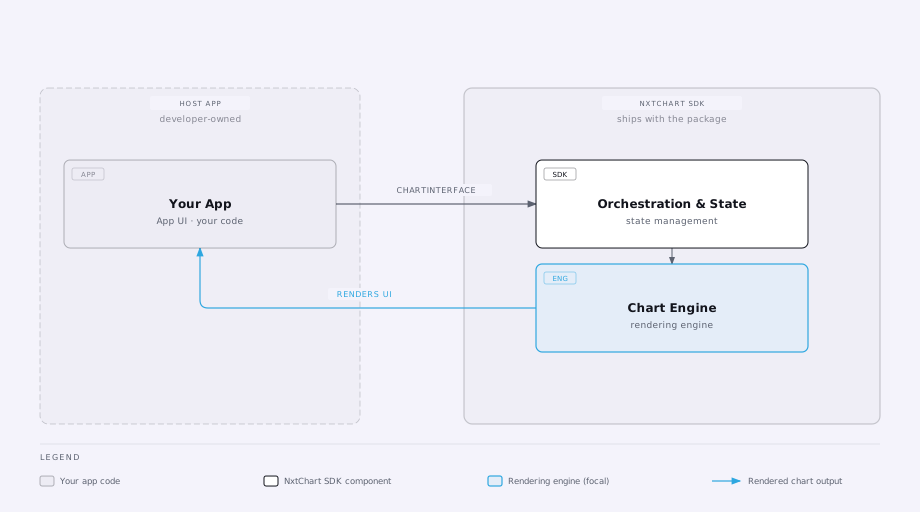
How data flows between your app and the NeoCharts SDK.
Market Data Flow
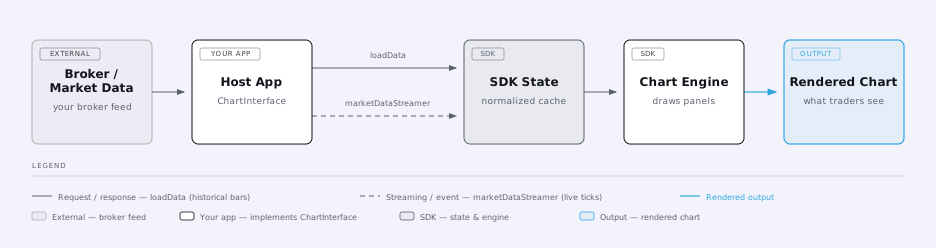
Data flows from your integration into the SDK in three phases:
- Startup metadata —
symbolInfo,marketTimings,optionSymbols, etc. Called once on mount; all must resolve before the chart renders. - Historical bars —
loadDatais called on initial load, on scroll (older bars), and on timeframe change. See theloadDataschema. - Live ticks — pushed continuously from your tick source via
marketDataStreamer. Only applied to the candle series whilemarketTimingssays the market is open — get that field wrong and streaming silently stops.
Trade Flow
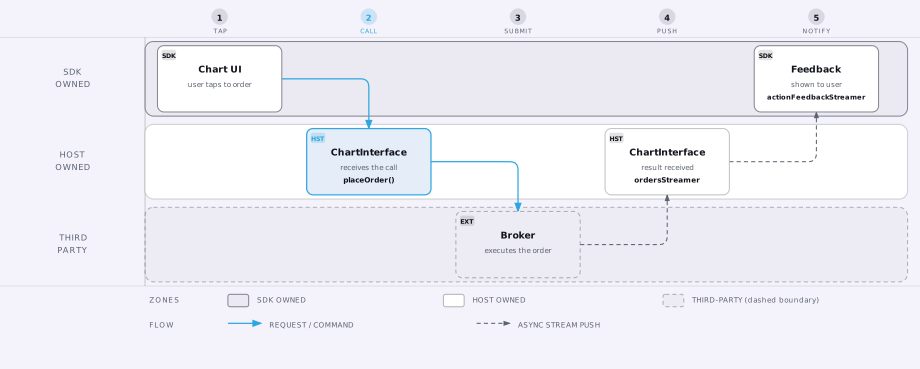
When the user places an order from the chart UI, the SDK calls placeOrder (or the OCO
variant) on your integration. Your app submits to the broker and reflects the outcome by
pushing to ordersStreamer. User-facing feedback for the action (success, rejection,
cancellation) is pushed via actionFeedbackStreamer, which must be a broadcast stream.
Positions follow the same pattern: push to positionsStreamer whenever your broker reports a
change; the SDK never polls for positions.
Alerts Flow
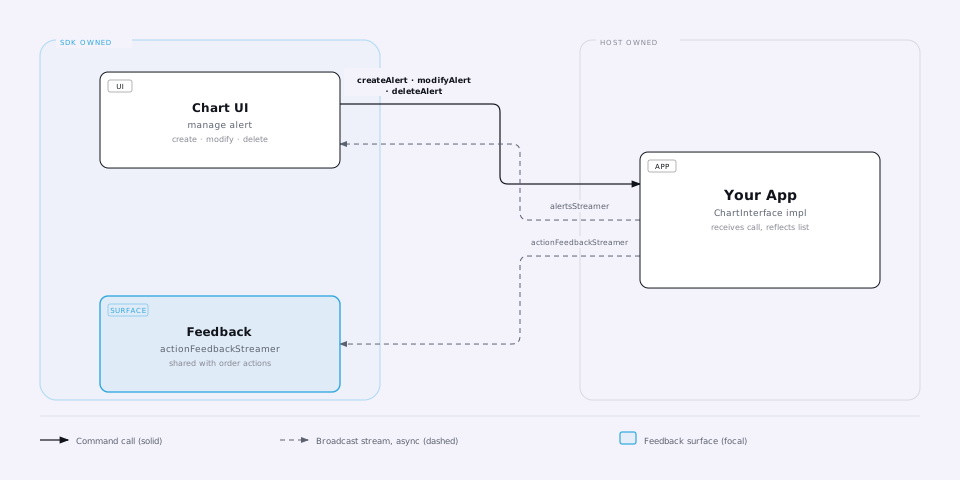
Price alerts are a parallel, symbol-agnostic flow — an alert can reference any symbol, not just the one currently charted:
- The SDK calls
createAlert/modifyAlert/deleteAlerton your integration when the user manages an alert from the UI. See thecreateAlertschema. - Your app reflects the current alert list by pushing to
alertsStreamer— same broadcast-stream requirement asordersStreamer.
Option-Chain OI Analysis Flow
Three OI-related features share three methods — implement whichever your app's features need;
each resolves to null (or is simply never called) when unused. On iOS/Android, simply
omitting the method's case from your channel handler (falling through to
FlutterMethodNotImplemented/notImplemented) is treated identically to returning null
explicitly — no separate opt-out step needed.
| Feature | Method | Scope |
|---|---|---|
| OI Profile (current OI) | fetchOI | Point-in-time snapshot, summed across the expiries you pass |
| OI Profile (change) / OI Change Analysis | fetchOIChange | OI change over a time window, summed across expiries |
| OI Analysis screen | fetchOIAnalysis | OI, OI-change, and previous-OI per strike, for the strikes around ATM you return, for a single expiry over a time window |
fetchOIAnalysis does not receive a strike range — your implementation must derive the
current ATM strike itself (the same way atmSymbols does) and return the strikes around it
you want shown. The SDK does not trim: every strike you return renders, in a
scrollable, ATM-centered chart.
Flutter interface ↔ native channel
The flows above are described in terms of the Flutter ChartInterface. On Android/iOS,
each maps to a nxtchart/data method (request/response) or a standalone channel
(EventChannel/FlutterEventChannel, host-pushes-to-sink) of the same purpose:
| Flutter interface member | Android / iOS channel |
|---|---|
marketDataStreamer | nxtchart/marketData |
ordersStreamer | nxtchart/orders |
ocoOrdersStreamer | nxtchart/ocoOrders |
positionsStreamer | nxtchart/positions |
actionFeedbackStreamer | nxtchart/tradeEvents |
alertsStreamer | nxtchart/alerts |
symbolInfo, marketTimings, loadData, placeOrder, createAlert, etc. | nxtchart/data (method channel) |
See the Trading section for the exact wire format these flows use.