
Flutter Integration
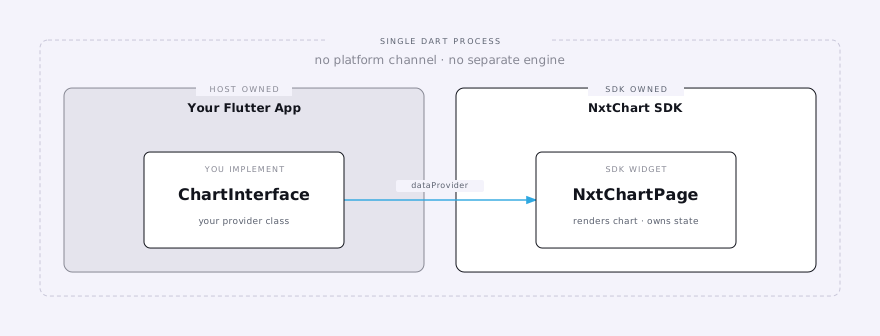
Integrate NeoCharts into a Flutter app by implementing ChartInterface and mounting NxtChartPage.
Drop in one widget, implement one interface, get a fully interactive chart with real-time data, technical indicators, order/position overlays, and drawing tools.
This is the complete integration — trading, alerts, and option chain.
Requirements
| Requirement | Minimum |
|---|---|
| Flutter SDK | 3.47.0 |
| Dart SDK | 3.13.0 |
| Platforms | Android, iOS |
| Build network | HTTPS access to lic-neocharts.nxtoption.com |
1. Add the dependency
Access
NeoCharts is distributed directly to licensed partners, not published to pub.dev. Your IOURING
team provides the Git repository URL and version tag below, along with repository access (an SSH
deploy key or an HTTPS access token) — flutter pub get fails with a git authentication error
until that access is configured on your machine or CI.
# pubspec.yaml
dependencies:
  nxtchart:
    git:
      url: <neocharts-sdk-repository-url>  # the neocharts-sdk repo you were given access to
      ref: <version-tag>
Pick ref: from the repository's git tags (e.g. 0.0.35+17) — don't invent one.
flutter pub get2. Add your NeoCharts license
IOURING sends you your key file, neocharts-key.json, built for the app IDs
you listed. Put it next to your app's pubspec.yaml and list it as an asset:
flutter:
  assets:
    - neocharts-key.json
The build downloads the NeoCharts core from lic-neocharts.nxtoption.com, so your build machines
need HTTPS access to it.
Every Android application ID and iOS bundle ID you build must be in your
license, including flavours and suffixes such as .debug. See
Licensing for what to send IOURING.
3. Implement ChartInterface
import 'dart:async';
import 'dart:convert';

import 'package:nxtchart/interface.dart';

class MyChartController implements ChartInterface {
  // One broadcast controller per stream, created once per instance -- see
  // "Must be broadcast streams" below. Push JSON with e.g. _orders.add(json).
  final _ticks = StreamController<String>.broadcast();
  final _orders = StreamController<String>.broadcast();
  final _ocoOrders = StreamController<String>.broadcast();
  final _positions = StreamController<String>.broadcast();
  final _alerts = StreamController<String>.broadcast();
  final _actionFeedback = StreamController<String>.broadcast();

  @override
  String get storageKey => 'user_123'; // stable, user-scoped key

  @override
  String get symbolInfo => jsonEncode({
    'id': 'RELIANCE',
    'name': 'Reliance Industries',
    'lotSize': 1,
    'precision': 2,
    'tickSize': 0.05,
    'exchange': 'NSE',
    'expiry': '', // e.g. '2025-03-27' for a derivative; empty for this equity
    'strike': '', // e.g. '23000' for an option; empty for this equity
    'optType': '', // e.g. 'CE' or 'PE' for an option; empty for this equity
    'weekly': '', // e.g. 'Y' marks a weekly expiry; empty for this equity
    'undID': '', // e.g. 'NIFTY' for a derivative; empty for this equity
  });

  @override
  String? get underlyingSymbolInfo => ''; // empty: this equity is the underlying

  @override
  String get optionSymbols => '[]';

  @override
  String? get futureSymbols => null;

  @override
  String? get indexSymbols => null;

  @override
  Future<String?> get atmSymbols async => null;

  @override
  String get marketTimings => jsonEncode({
    // Keyed by exchange code -- add one entry per exchange any symbol
    // reachable this session might resolve to (e.g. also 'NFO' once
    // options are in play). A missing exchange throws; see the
    // marketTimings reference doc.
    'NSE': {
      'timezone': 'Asia/Kolkata',
      'sessions': [
        ['0915-1530'], // Monday
        ['0915-1530'], // Tuesday
        ['0915-1530'], // Wednesday
        ['0915-1530'], // Thursday
        ['0915-1530'], // Friday
        <String>[], // Saturday
        <String>[], // Sunday
      ],
      'holidays': <String>[],
      'special': <String, dynamic>{},
    },
  });

  @override
  Future<String> get chartTopOptions async {
    // JSON list of top options ranked by volume. Entries are keyed by
    // `symId`, not `id` -- see the chartTopOptions reference doc.
    return yourApi.fetchTopOptions();
  }

  @override
  Future<String> loadData({
    required String symbolId,
    required int from, // epoch milliseconds
    required int to, // epoch milliseconds
    required int intervalSeconds,
    required int requiredBars,
  }) async {
    final bars = await yourApi.fetchOHLCV(
      symbolId: symbolId,
      from: from,
      to: to,
      interval: intervalSeconds,
    );
    return jsonEncode(bars); // [[timeMs, open, high, low, close, volume], ...]
  }

  @override
  Stream<String> marketDataStreamer(String symbols) {
    // Called again with the complete new list every time the subscribed set
    // changes. Resubscribe your feed to exactly these ids and return a stream
    // that can be listened to again.
    yourTickFeed.subscribe(List<String>.from(jsonDecode(symbols) as List));
    return _ticks.stream;
  }

  @override
  Stream<String> searchSymbolsStreamer(String query) {
    return yourApi.searchSymbols(query).asStream().map(jsonEncode);
  }

  @override
  // Called when the user picks a symbol in symbol search, taps an option-chain
  // row, or swaps CE/PE or Spot/Fut. Return a new ChartInterface for
  // symbolJson to enable those; returning null makes those taps do nothing.
  // The SDK never disposes the instances you return -- you own them.
  ChartInterface? chartInterfaceForSymbol(String symbolJson) => null;

  @override
  bool get hasOCO => true;

  @override
  bool get isMarketOrderSupported => true;

  @override
  void placeOrder(String params) {
    yourBroker.placeOrder(jsonDecode(params));
  }

  @override
  void modifyOrder(String params) => yourBroker.modifyOrder(jsonDecode(params));

  @override
  void cancelOrder(String orderID) => yourBroker.cancelOrder(orderID);

  @override
  void placeOCOOrder(String params) =>
      yourBroker.placeOCOOrder(jsonDecode(params));

  @override
  void modifyOCOOrder(String params) =>
      yourBroker.modifyOCOOrder(jsonDecode(params));

  @override
  void cancelOCOOrder(String groupId) => yourBroker.cancelOCOOrder(groupId);

  @override
  void groupAdjustOrders(String params) =>
      yourBroker.groupAdjustOrders(jsonDecode(params));

  @override
  Stream<String> get ordersStreamer => _orders.stream;

  @override
  Stream<String> get positionsStreamer => _positions.stream;

  @override
  Future<String> get fundsData => yourApi.fetchFundsData();

  @override
  Stream<String> get actionFeedbackStreamer => _actionFeedback.stream;

  @override
  Stream<String> get ocoOrdersStreamer => _ocoOrders.stream;

  @override
  Future<String> fetchOptionDetails({required String underlyingSymbolId}) =>
      yourApi.fetchOptionChain(underlyingSymbolId);

  @override
  Future<String?> fetchOIAnalysis({
    required String underlyingSymbolId,
    required String expiry,
    required int timeFrom,
    required int timeTo,
  }) =>
      yourApi.fetchOIAnalysis(underlyingSymbolId, expiry, timeFrom, timeTo);

  @override
  Future<String?> fetchOIChange({
    required String underlyingSymbolId,
    required List<String> expiries,
    required int timeFrom,
    required int timeTo,
  }) =>
      yourApi.fetchOIChange(underlyingSymbolId, expiries, timeFrom, timeTo);

  @override
  Future<String?> fetchOI({
    required String underlyingSymbolId,
    required List<String> expiries,
  }) =>
      yourApi.fetchOI(underlyingSymbolId, expiries);

  @override
  Future<String> fetchPcrIntraday() => yourApi.fetchPcrIntraday();

  @override
  Future<String> fetchAtmStraddleIntraday() =>
      yourApi.fetchAtmStraddleIntraday();

  @override
  Future<String> fetchAtmIvIntraday() => yourApi.fetchAtmIvIntraday();

  // Parameterized replacements (xxxFor) -- scoped to an explicit id instead
  // of "whatever's currently charted." underlyingSymbolInfoFor runs on every
  // chart load and chartTopOptionsFor backs the Top 5 panel. The rest aren't
  // called by NxtChartPage yet, but return real data rather than throwing --
  // see /docs/trading/chart-data and /docs/trading/option-chain.
  @override
  Future<String?> underlyingSymbolInfoFor(String symbolId) =>
      yourApi.fetchUnderlyingSymbolInfo(symbolId);

  @override
  Future<String> optionSymbolsFor(String underlyingId) =>
      yourApi.fetchOptionSymbols(underlyingId);

  @override
  Future<String?> futureSymbolsFor(String underlyingId) =>
      yourApi.fetchFutureSymbols(underlyingId);

  @override
  Future<String?> atmSymbolsFor(String underlyingId) =>
      yourApi.fetchAtmSymbols(underlyingId);

  @override
  Future<String> chartTopOptionsFor(String underlyingId) =>
      yourApi.fetchTopOptions(underlyingId);

  @override
  Future<String> fetchPcrIntradayFor(String underlyingId) =>
      yourApi.fetchPcrIntraday(underlyingId);

  @override
  Future<String> fetchAtmStraddleIntradayFor(String underlyingId) =>
      yourApi.fetchAtmStraddleIntraday(underlyingId);

  @override
  Future<String> fetchAtmIvIntradayFor(String underlyingId) =>
      yourApi.fetchAtmIvIntraday(underlyingId);

  @override
  void modifyAlert(String params) => yourBroker.modifyAlert(jsonDecode(params));

  @override
  void createAlert(String params) => yourBroker.createAlert(jsonDecode(params));

  @override
  void deleteAlert(String alertId) => yourBroker.deleteAlert(alertId);

  @override
  Stream<String> get alertsStreamer => _alerts.stream;

  @override
  // Only called when NxtChartPage has no host Navigator above it. A Flutter
  // app that pushes the page as a route (step 4) can leave this empty.
  void closeRequested() {}

  @override
  // Called by NxtChartPage itself when it's removed -- don't call it yourself.
  void dispose() {
    yourTickFeed.unsubscribeAll();
    for (final c in [
      _ticks,
      _orders,
      _ocoOrders,
      _positions,
      _alerts,
      _actionFeedback,
    ]) {
      c.close();
    }
  }
}
Must be broadcast streams
marketDataStreamer, ordersStreamer, positionsStreamer, ocoOrdersStreamer,
alertsStreamer, and actionFeedbackStreamer must return broadcast streams. The SDK listens
more than once — marketDataStreamer on every change to the subscribed symbol set, and the
trading/alert streams again on each instance you return from chartInterfaceForSymbol, which
usually shares your app's underlying sources. A single-subscription stream crashes with
Bad state: Stream has already been listened to. Back each one with a
StreamController<String>.broadcast() held in a field, as above. Calling
.asBroadcastStream() inside the getter doesn't help: every call wraps the source again, and
the second wrapper's listen still fails.
4. Mount the widget
Push NxtChartPage as a full-screen route, with a new controller each time:
import 'package:nxtchart/widgets.dart';

void openChart(BuildContext context) {
  // A fresh controller per open -- NxtChartPage disposes it when it closes.
  final controller = MyChartController();
  // Root navigator: the chart's close button pops the root Navigator.
  Navigator.of(context, rootNavigator: true).push(
    MaterialPageRoute<void>(
      builder: (_) => NxtChartPage(dataProvider: controller),
    ),
  );
}- Don't construct the controller inside a
buildmethod that can run again —NxtChartPagekeeps the firstdataProviderit was given and never disposes the others. - Mount one
NxtChartPageat a time. Live data runs through process-wide streaming services: a second page takes them over from the first, and closing either stops them for both. NxtChartPagechanges orientation, system UI, and back handling while it's open — see What NxtChartPage takes over before you wire it into your navigation.
Run the app — you should see a live chart with real-time data, indicators, drawing tools, and working order/position/alert actions.
5. Host app setup
Android
Add android:enableOnBackInvokedCallback="false" to your app's own launcher activity
(usually .MainActivity in android/app/src/main/AndroidManifest.xml), keeping all its
existing attributes:
<activity
    android:name=".MainActivity"
    android:enableOnBackInvokedCallback="false"
    ... >
Required, not optional
Without it, the system back gesture can exit the whole activity instead of closing an open
chart overlay (order pad, popups, bottom sheets). Don't copy the manifest from the
Android Quick Start — that one is for native apps that embed a
FlutterActivity, and its <activity> entry isn't a launcher.
- Internet: the chart loads its fonts from Google Fonts at runtime. Flutter adds
android.permission.INTERNETto debug builds only, so your release manifest must declare it (most trading apps already do). - SDK levels: the reference app builds with Flutter's defaults
(
minSdk = flutter.minSdkVersion,compileSdk = flutter.compileSdkVersion).
iOS
- Orientations: the chart opens in landscape. iOS ignores an orientation request your
Info.plistdoesn't allow, soUISupportedInterfaceOrientationsmust includeUIInterfaceOrientationLandscapeLeftandUIInterfaceOrientationLandscapeRightalongside portrait. - Deployment target: the reference app builds with iOS 15.0.
Two-panel layouts (Index + Call/Put, Call + Put)
NxtChartPage can render a two-panel layout — the underlying chart plus its ATM CE/PE
strikes, or just the CE/PE strikes side by side — but this is chosen by the user at runtime
from the chart's own Layout settings tab, not by a separate constructor or argument. See
Chart Layouts for the full picture.
The one thing you still provide is the same atmSymbols getter this always needed — two
full symbol objects (same shape as symbolInfo), not bare ids:
@override
Future<String?> get atmSymbols async => jsonEncode([
  {'id': 'NIFTY24DEC24000CE', 'name': 'NIFTY 24000 CE', 'optType': 'CE',
   'strike': '24000', 'expiry': '2024-12-26', 'exchange': 'NFO', 'undID': 'NIFTY'},
  {'id': 'NIFTY24DEC24000PE', 'name': 'NIFTY 24000 PE', 'optType': 'PE',
   'strike': '24000', 'expiry': '2024-12-26', 'exchange': 'NFO', 'undID': 'NIFTY'},
]);
Mount NxtChartPage exactly as shown in step 4 above — there's no separate constructor to
call. The Android back flag from step 5 matters most here, since these layouts open the most
overlays.
Lifecycle
- Disposal:
NxtChartPagecallsdispose()on the controller you passed when it's removed from the tree. Don't call it yourself, and don't reuse that instance — a disposed controller's streams stay closed, so a reopened chart shows frozen prices. - Navigated-to symbols: instances you return from
chartInterfaceForSymbolare never disposed by the SDK. Track them and close them yourself, for example from your original controller'sdispose(). - One page at a time: see step 4.
Errors
What the SDK does when your implementation fails:
| Failure | What happens |
|---|---|
loadData throws an Exception (incl. a FormatException from bad JSON) | The chart shows its retry state |
loadData throws anything that isn't an Exception (e.g. a TypeError) | Not caught by the SDK — surfaces as an uncaught error. Convert to an Exception, or return '[]' for "no data" |
An error event, or malformed JSON, on ordersStreamer, ocoOrdersStreamer, positionsStreamer, or alertsStreamer | Uncaught async error; that update is dropped and the list keeps its previous value. Catch broker errors upstream and push only valid JSON |
Malformed JSON on actionFeedbackStreamer | Silently dropped — no snackbar |
An error event on marketDataStreamer | Ignored (debug log only); ticks for the failed feed simply stop |
A symbol's exchange missing from marketTimings | assert in debug, TypeError in release — see marketTimings |
Route your app's uncaught errors to your crash reporter (FlutterError.onError and
PlatformDispatcher.instance.onError) so the uncaught cases above are visible in production.
Go-live checklist
- Every
ChartInterfacemember returns real data — nothrow UnimplementedError(), includingunderlyingSymbolInfoForandchartTopOptionsFor. marketTimingshas an entry for every exchange any reachable symbol can resolve to (option chain, search results, scalper panels).- All six streams are backed by broadcast controllers.
actionFeedbackStreamerpushes feedback for every order and alert action — it's the only source of the chart's snackbars.storageKeyis stable per user, not per session.- Android back flag and
INTERNETpermission; iOS landscape orientations. - Tested in a release build (
flutter run --release) — debug-only asserts are gone there, so some failures change shape.
Troubleshooting
| Symptom | Fix |
|---|---|
| Back button exits the whole chart/app instead of closing an overlay (Android) | Set android:enableOnBackInvokedCallback="false" on your launcher <activity> — see step 5 |
| Tapping a symbol search result or an option-chain row does nothing | chartInterfaceForSymbol returns null — return a ChartInterface for the tapped symbol |
| "Your NeoCharts license is invalid or has expired." instead of the chart | neocharts-key.json is not listed under flutter: assets:, the file was edited (it is signed), or this app ID isn't in your license — see Licensing |
Build fails with No NeoCharts core … | The build machine can't reach lic-neocharts.nxtoption.com over HTTPS |
| Prices frozen after closing and reopening the chart | The controller was reused after NxtChartPage disposed it — create a new one per open |
"Bad state: Stream has already been listened to"
One of your streamers is single-subscription. Back it with a broadcast controller held in a field:
final _actionFeedback = StreamController<String>.broadcast();

@override
Stream<String> get actionFeedbackStreamer => _actionFeedback.stream;
This applies to marketDataStreamer, ordersStreamer, positionsStreamer,
ocoOrdersStreamer, alertsStreamer, and actionFeedbackStreamer.
loadData never completes / chart stays blank
Check that your loadData implementation is async, actually awaits its data source, and
that the source itself completes:
@override
Future<String> loadData({...}) async {
  final bars = await yourApi.fetchOHLCV(...); // must await
  return jsonEncode(bars);
}
Without the await, bars is a Future and jsonEncode throws a
JsonUnsupportedObjectError — an Error, not an Exception, so it escapes the SDK's load
handling (see Errors).
See Trading for wire formats.