
Android Integration
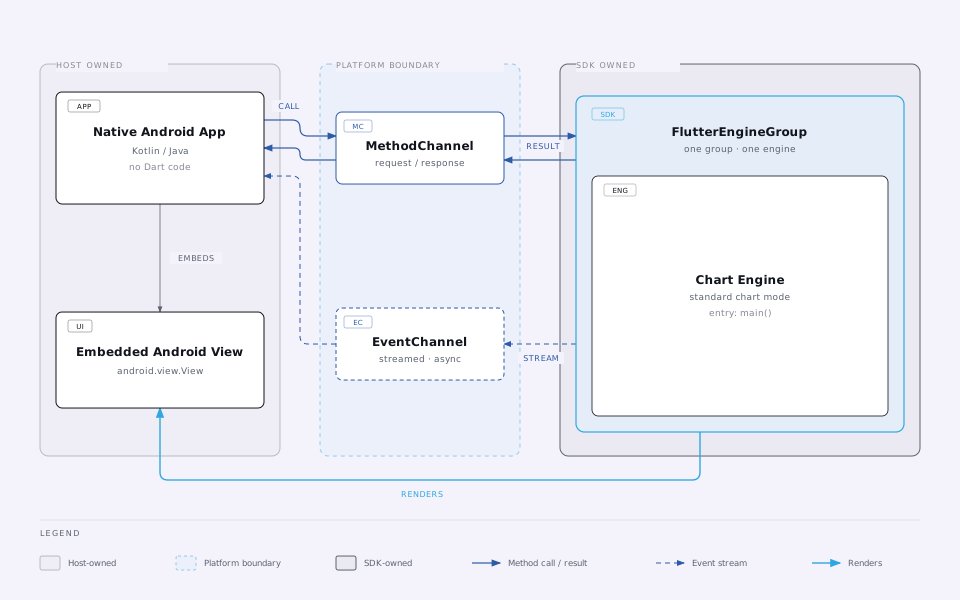
Embed NeoCharts into a native Android app via platform channels.
Embed NeoCharts into an existing native Android app (Kotlin / Java).
The SDK is distributed as a pre-built binary (AAR) — your native app only implements the platform channel handlers that supply data and receive trading callbacks.
This is the complete integration — the full channel set, alerts, and OI analysis.
Requirements
| Requirement | Minimum |
|---|---|
| Android API level | 24 (Android 7.0) |
| Kotlin | 1.7+ |
| Android Gradle Plugin | 8.x |
| Java | 17 |
1. Add the provided .aar files
Access
NeoCharts is distributed directly to licensed partners, not published to a public repository.
Your IOURING team sends you the .aar file(s) directly — no repository involved. Place
them in a local libs/ folder in your app module.
License
The .aar files are built for your app and already contain your license — no key file to add.
Every application ID you build (flavours and suffixes such as .debug included) must be in your
license, and the app needs internet access for a once-a-day license check. See
Licensing.
// app/build.gradle.kts
dependencies {
    releaseImplementation(files("libs/nxtchart-flutter_release.aar"))
    // additional plugin AARs provided alongside it, referenced the same way
}
2. Register channel handlers
Register all handlers in Application.onCreate before the Flutter engine starts.
import io.flutter.embedding.engine.FlutterEngineCache
import io.flutter.embedding.engine.FlutterEngineGroup
import io.flutter.embedding.engine.dart.DartExecutor
import io.flutter.plugin.common.BinaryMessenger
import io.flutter.plugin.common.MethodChannel
import io.flutter.plugin.common.EventChannel
import org.json.JSONObject

class App : Application() {

    // EventChannel sinks — whichever view is active holds the live reference
    var marketDataSink: EventChannel.EventSink? = null
    var ordersSink:     EventChannel.EventSink? = null
    var ocoOrdersSink:  EventChannel.EventSink? = null
    var positionsSink:  EventChannel.EventSink? = null
    var tradeEventSink: EventChannel.EventSink? = null
    var alertsSink:     EventChannel.EventSink? = null

    override fun onCreate() {
        super.onCreate()

        val group = FlutterEngineGroup(this)
        val chartEngine = group.createAndRunEngine(
            this, DartExecutor.DartEntrypoint.createDefault()
        )
        FlutterEngineCache.getInstance().put("nxtchart_chart", chartEngine)

        registerChannels(chartEngine.dartExecutor.binaryMessenger)
    }

    private fun registerChannels(messenger: BinaryMessenger) {

        // ── nxtchart/data ─────────────────────────────────────────────────────
        MethodChannel(messenger, "nxtchart/data")
            .setMethodCallHandler { call, result ->
                when (call.method) {

                    // ── Init metadata (called once at startup) ───────────────
                    "symbolInfo"           -> result.success(yourSymbolInfoJson())
                    "underlyingSymbolInfo" -> result.success(yourUnderlyingSymbolInfo())
                    "optionSymbols"        -> result.success(yourOptionSymbolsJson())
                    "futureSymbols"        -> result.success(yourFutureSymbolsJson())
                    // Populating this hides the Volume indicator for symbols
                    // in the list (spot indices have no traded volume).
                    "indexSymbols"         -> result.success(yourIndexSymbolsJson())
                    // JSON map keyed by exchange code (e.g. "NSE", "NFO") --
                    // cover every exchange any symbol reachable this session
                    // might resolve to, not just the main chart's own symbol.
                    "marketTimings"        -> result.success(yourMarketTimingsJson())
                    "hasOCO"               -> result.success(true)
                    "isMarketOrderSupported" -> result.success(true)
                    "storageKey"           -> result.success("user_${yourUserId()}")
                    // Called each time the right panel is shown, not
                    // cached at startup — safe to delay until background data
                    // (e.g. option chain) finishes loading.
                    "atmSymbols"           -> result.success(yourAtmSymbolsJson())
                    "chartTopOptions"      -> fetchTopOptions { json -> result.success(json) }

                    // ── Historical data ──────────────────────────────────────
                    "loadData" -> {
                        val symbolId        = call.argument<String>("symbolId")!!
                        val from            = call.argument<Int>("from")!!.toLong()
                        val to              = call.argument<Int>("to")!!.toLong()
                        val intervalSeconds = call.argument<Int>("intervalSeconds")!!
                        val requiredBars    = call.argument<Int>("requiredBars")!!
                        fetchOHLCV(symbolId, from, to, intervalSeconds, requiredBars) { json ->
                            result.success(json)
                        }
                    }

                    // ── Option chain & OI analysis ────────────────────────────
                    "fetchOptionDetails" -> {
                        val underlyingSymbolId = call.argument<String>("underlyingSymbolId")!!
                        fetchOptionDetails(underlyingSymbolId) { json -> result.success(json) }
                    }
                    "fetchOIAnalysis" -> {
                        val underlyingSymbolId = call.argument<String>("underlyingSymbolId")!!
                        val expiry             = call.argument<String>("expiry")!!
                        val timeFrom           = call.argument<Int>("timeFrom")!!
                        val timeTo             = call.argument<Int>("timeTo")!!
                        fetchOIAnalysis(underlyingSymbolId, expiry, timeFrom, timeTo) { json ->
                            result.success(json)
                        }
                    }
                    "fetchOIChange" -> {
                        val underlyingSymbolId = call.argument<String>("underlyingSymbolId")!!
                        val expiries           = call.argument<List<String>>("expiries")!!
                        val timeFrom           = call.argument<Int>("timeFrom")!!
                        val timeTo             = call.argument<Int>("timeTo")!!
                        fetchOIChange(underlyingSymbolId, expiries, timeFrom, timeTo) { json ->
                            result.success(json)
                        }
                    }
                    "fetchOI" -> {
                        val underlyingSymbolId = call.argument<String>("underlyingSymbolId")!!
                        val expiries           = call.argument<List<String>>("expiries")!!
                        fetchOI(underlyingSymbolId, expiries) { json -> result.success(json) }
                    }
                    "fetchPcrIntraday"         -> fetchPcrIntraday { json -> result.success(json) }
                    "fetchAtmStraddleIntraday" -> fetchAtmStraddleIntraday { json -> result.success(json) }
                    "fetchAtmIvIntraday"       -> fetchAtmIvIntraday { json -> result.success(json) }

                    // ── Parameterized replacements (xxxFor) -- scoped to an explicit
                    //    id instead of "whatever's currently charted." underlyingSymbolInfoFor
                    //    is called on every chart load; the other 7 aren't called by the SDK
                    //    yet, but still need a real case here or every call falls through to
                    //    notImplemented() below. See /docs/trading/chart-data and
                    //    /docs/trading/option-chain for which is which. ──────────────────
                    "underlyingSymbolInfoFor" -> {
                        val symbolId = call.argument<String>("symbolId")!!
                        result.success(yourUnderlyingSymbolInfoJson(symbolId)) // nullable
                    }
                    "optionSymbolsFor" -> {
                        val underlyingId = call.argument<String>("underlyingId")!!
                        result.success(yourOptionSymbolsJson(underlyingId))
                    }
                    "futureSymbolsFor" -> {
                        val underlyingId = call.argument<String>("underlyingId")!!
                        result.success(yourFutureSymbolsJson(underlyingId)) // nullable
                    }
                    "atmSymbolsFor" -> {
                        val underlyingId = call.argument<String>("underlyingId")!!
                        result.success(yourAtmSymbolsJson(underlyingId)) // nullable
                    }
                    "chartTopOptionsFor" -> {
                        val underlyingId = call.argument<String>("underlyingId")!!
                        result.success(yourTopOptionsJson(underlyingId))
                    }
                    "fetchPcrIntradayFor" -> {
                        val underlyingId = call.argument<String>("underlyingId")!!
                        fetchPcrIntraday(underlyingId) { json -> result.success(json) }
                    }
                    "fetchAtmStraddleIntradayFor" -> {
                        val underlyingId = call.argument<String>("underlyingId")!!
                        fetchAtmStraddleIntraday(underlyingId) { json -> result.success(json) }
                    }
                    "fetchAtmIvIntradayFor" -> {
                        val underlyingId = call.argument<String>("underlyingId")!!
                        fetchAtmIvIntraday(underlyingId) { json -> result.success(json) }
                    }

                    // ── Funds (fetched each time the drawer's Funds panel opens) ─
                    "fundsData" -> result.success(yourFundsDataJson())

                    // ── Alerts ─────────────────────────────────────────────────
                    "modifyAlert" -> {
                        yourBroker.modifyAlert(call.arguments as String)
                        result.success(null)
                    }
                    "createAlert" -> {
                        yourBroker.createAlert(call.arguments as String)
                        result.success(null)
                    }
                    "deleteAlert" -> {
                        val alertId = call.argument<String>("alertId")!!
                        yourBroker.deleteAlert(alertId)
                        result.success(null)
                    }

                    // ── Order actions (params arrive as a raw JSON string —
                    //    see Reference for each method's exact shape) ──────────
                    "placeOrder" -> {
                        val p = JSONObject(call.arguments as String)
                        yourBroker.placeOrder(
                            p.getString("symID"), p.getDouble("price"),
                            p.getString("orderType"), p.getString("orderAction"),
                            p.getInt("qty"),
                        )
                        result.success(null)
                    }
                    "modifyOrder" -> {
                        val p = JSONObject(call.arguments as String)
                        yourBroker.modifyOrder(
                            p.getString("orderID"), p.getString("symID"), p.getDouble("price"),
                            p.getString("orderType"), p.getString("orderAction"), p.getInt("qty"),
                        )
                        result.success(null)
                    }
                    "cancelOrder" -> {
                        val orderID = call.argument<String>("orderID")!!
                        yourBroker.cancelOrder(orderID)
                        result.success(null)
                    }
                    "placeOCOOrder" -> {
                        yourBroker.placeOCOOrder(call.arguments as String)
                        result.success(null)
                    }
                    "modifyOCOOrder" -> {
                        yourBroker.modifyOCOOrder(call.arguments as String)
                        result.success(null)
                    }
                    "cancelOCOOrder" -> {
                        val groupId = call.argument<String>("groupId")!!
                        yourBroker.cancelOCOOrder(groupId)
                        result.success(null)
                    }
                    "groupAdjustOrders" -> {
                        yourBroker.groupAdjustOrders(call.arguments as String)
                        result.success(null)
                    }

                    else -> result.notImplemented()
                }
            }

        // ── nxtchart/marketData ───────────────────────────────────────────────
        EventChannel(messenger, "nxtchart/marketData")
            .setStreamHandler(object : EventChannel.StreamHandler {
                override fun onListen(args: Any?, sink: EventChannel.EventSink) {
                    marketDataSink = sink
                    val symbols = args as? String
                    yourTickSource.subscribe(symbols) { tickJson ->
                        marketDataSink?.success(tickJson)
                    }
                }
                override fun onCancel(args: Any?) { marketDataSink = null }
            })

        // ── nxtchart/symbolSearch ─────────────────────────────────────────────
        EventChannel(messenger, "nxtchart/symbolSearch")
            .setStreamHandler(object : EventChannel.StreamHandler {
                override fun onListen(args: Any?, sink: EventChannel.EventSink) {
                    // The chart takes only the first emission per query —
                    // no need to keep pushing after the initial result.
                    val query = args as? String
                    yourApi.searchSymbols(query) { json -> sink.success(json) }
                }
                override fun onCancel(args: Any?) {}
            })

        // ── nxtchart/orders ───────────────────────────────────────────────────
        EventChannel(messenger, "nxtchart/orders")
            .setStreamHandler(object : EventChannel.StreamHandler {
                override fun onListen(args: Any?, sink: EventChannel.EventSink) {
                    ordersSink = sink
                }
                override fun onCancel(args: Any?) { ordersSink = null }
            })

        // ── nxtchart/ocoOrders ────────────────────────────────────────────────
        EventChannel(messenger, "nxtchart/ocoOrders")
            .setStreamHandler(object : EventChannel.StreamHandler {
                override fun onListen(args: Any?, sink: EventChannel.EventSink) {
                    ocoOrdersSink = sink
                }
                override fun onCancel(args: Any?) { ocoOrdersSink = null }
            })

        // ── nxtchart/positions ────────────────────────────────────────────────
        EventChannel(messenger, "nxtchart/positions")
            .setStreamHandler(object : EventChannel.StreamHandler {
                override fun onListen(args: Any?, sink: EventChannel.EventSink) {
                    positionsSink = sink
                }
                override fun onCancel(args: Any?) { positionsSink = null }
            })

        // ── nxtchart/tradeEvents ──────────────────────────────────────────────
        EventChannel(messenger, "nxtchart/tradeEvents")
            .setStreamHandler(object : EventChannel.StreamHandler {
                override fun onListen(args: Any?, sink: EventChannel.EventSink) {
                    tradeEventSink = sink
                }
                override fun onCancel(args: Any?) { tradeEventSink = null }
            })

        // ── nxtchart/alerts ───────────────────────────────────────────────────
        EventChannel(messenger, "nxtchart/alerts")
            .setStreamHandler(object : EventChannel.StreamHandler {
                override fun onListen(args: Any?, sink: EventChannel.EventSink) {
                    alertsSink = sink
                }
                override fun onCancel(args: Any?) { alertsSink = null }
            })
    }
}
3. Launching the chart
startActivity(FlutterActivity.withCachedEngine("nxtchart_chart").build(this))Or embed as a Fragment:
val chartFragment = FlutterFragment
    .withCachedEngine("nxtchart_chart")
    .build()

supportFragmentManager
    .beginTransaction()
    .add(R.id.chart_container, chartFragment, "chart")
    .commit()
Run the app — you should see a live chart with real-time data, indicators, drawing tools, and working order/position/alert actions, all driven by the handlers you registered above.
4. Pushing live data
Once the EventChannel sinks are active, push data from wherever your streams emit:
val app = application as App

// Live ticks
app.marketDataSink?.success(
    """[{"symbolId":"RELIANCE","ltp":2411.5,"ltq":100,"chng":11.5,"chngPer":0.48,"ltt":1700001234}]"""
)

// Updated orders list — see Reference for the full Order JSON schema
app.ordersSink?.success(
    """[{"orderID":"ORD123","type":"limit","orderAction":"buy","productType":"normal","avgPrice":2400.0,"netQty":10,"fillQty":0,"ordTime":"20-11-2025 09:15:00","orderStatus":"open","symbol":{"id":"RELIANCE","...":"see symbolInfo"}}]"""
)

// Updated OCO orders list (pending SL+TP pairs) — see Reference for the full schema
app.ocoOrdersSink?.success(
    """[{"groupId":"OCO001","symID":"RELIANCE","name":"Reliance Industries","exchange":"NSE","side":"buy","productType":"normal","stopLoss":{"type":"stoploss","side":"sell","triggerPrice":2350.0,"qty":10,"price":2340.0,"fillQty":0},"target":{"type":"limit","side":"sell","triggerPrice":2450.0,"qty":10,"price":2450.0,"fillQty":0}}]"""
)

// Updated positions list — see Reference for the full Position JSON schema
app.positionsSink?.success(
    """[{"symID":"RELIANCE","netQty":10,"avgPrice":2400.0,"productType":"normal"}]"""
)

// Action feedback (order/alert outcome notification)
app.tradeEventSink?.success(
    """{"type":"positive","message":"Order placed successfully"}"""
)

// Updated alerts list — see Reference for the full alert JSON schema
app.alertsSink?.success(
    """[{"alertId":"357807025062912","symbolInfo":{"id":"RELIANCE","...":"see symbolInfo"},"triggerPrice":"2450","enabled":true,"triggered":false,"createdAt":1769509922000}]"""
)
Tip
Push ordersSink and positionsSink before or during loadData so the chart
has order/position state ready on first render.
5. AndroidManifest.xml
<activity
    android:name="io.flutter.embedding.android.FlutterActivity"
    android:enableOnBackInvokedCallback="false"
    android:exported="false"
    android:hardwareAccelerated="true"
    android:windowSoftInputMode="adjustResize" />

<uses-permission android:name="android.permission.INTERNET" />
Required, not optional
android:enableOnBackInvokedCallback="false" — set it explicitly even though it defaults to
false on paper. NxtChartPage closes overlays (order pad, popups, bottom sheets) on back
press instead of exiting the chart; Android's predictive-back gesture can race that behavior
and exit the whole activity instead. Setting this flag disables predictive-back dispatch on
the host <activity> and removes the race.
Channel Reference
See the Trading section — each page documents its own nxtchart/data
method(s) and channel per platform; the shape is identical on Android and iOS, only the
calling syntax differs (shown above).
Theming (theme on nxtchart/data, and the nxtchart/theme channel) is optional; see
Theming.
Troubleshooting
| Symptom | Fix |
|---|---|
minSdkVersion build error | Set minSdk = 24 in build.gradle.kts |
| "Your NeoCharts license is invalid or has expired." instead of the chart | This application ID isn't in your license, or the bundles were built for a different app — see Licensing |
| Blank chart — init never completes | Ensure all startup methods on nxtchart/data (symbolInfo, underlyingSymbolInfo, optionSymbols, futureSymbols, indexSymbols, marketTimings, hasOCO, isMarketOrderSupported, storageKey) return a value (no notImplemented) |
| Blank chart — no candles | Verify loadData returns valid OHLCV JSON ordered oldest-first |
| Orders/positions not shown | Push to ordersSink/positionsSink before or during loadData |
| Alerts not shown | Push to alertsSink whenever your alert list changes |
| Funds panel blank | Implement fundsData on nxtchart/data |
MissingPluginException | Register all channels in Application.onCreate before engine starts |
| Back button exits the whole chart/app instead of closing an overlay | Set android:enableOnBackInvokedCallback="false" on the host <activity> — see § 5 above |
See the Trading section for wire formats and every nxtchart/data method,
and How It Works for the data and trade flow.